Lab 8: Auto Complete
Overview
This is the second week of the multi-week project that will build on your lab 6 assignment. The project will allow you to integrate learning from throughout the freshman software development and data structures sequence. You will develop several data structures and analyze the advantages and disadvantages of each. The project will result in a graphical user interface showing the results.
Video introduction for the lab
Assignment
Your program must have a graphical user interface with functionality similar to the one shown here. Your interface does not need to look exactly like the example, but it must provide all of the functionality described below.

The graphical user interface must allow the user to:
- select and load one of the word-list files from the
datafolder, - enter text to search for autocomplete matches,
- view autocomplete results,
- view timing results for the
UnorderedList,OrderedList, andBinarySearchTreeimplementations, and - independently switch the backing list used by
UnorderedListandOrderedListbetweenArrayListandLinkedList.
The list of displayed matches must update immediately whenever a character is typed or deleted.
- If the search box contains three or more characters, call
allMatches()using the current search text and display the matching words. - If the search box contains fewer than three characters, call
allMatches("")and display the entire contents of the currently loaded word list. - Timing measurements should only be displayed when the search box contains three or more characters.
- When the search box contains three or more characters, measure and display the time required for both
exactMatch()andallMatches()for all threeAutoCompleterimplementations. - If the search box contains fewer than three characters, clear all timing-result fields.
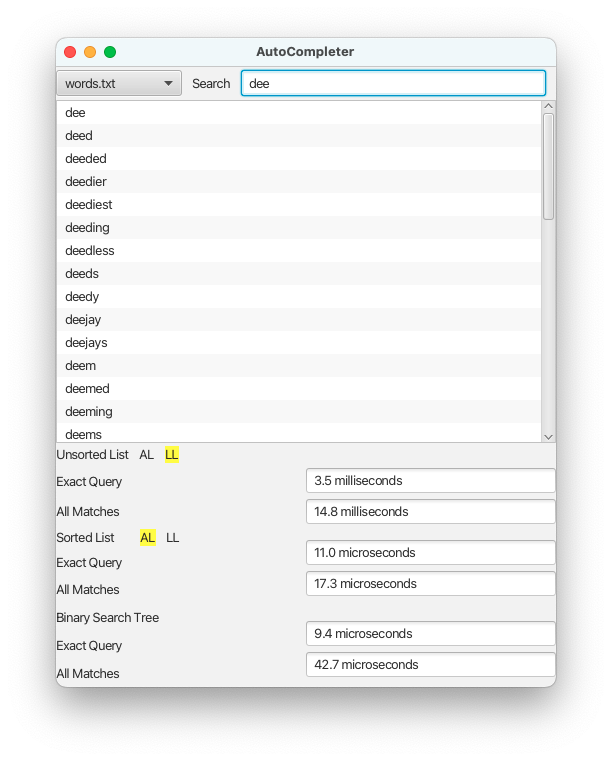
There are several word-list files available in the data folder of the repository. The user must select the word list through the graphical user interface. When a new word list is loaded, clear the search field and all timing fields, then display the complete newly loaded dictionary using the behavior of allMatches("").
Details
Build on Lab 6
Begin by incorporating your instructor's feedback from lab 6 and build on that IntelliJ project.
Update your Lab 6 JUnit tests as needed so that the same behavioral tests can be used with any AutoCompleter implementation. You should not need to create a separate copy of every test for every implementation. For example, it is acceptable to manually change the type of AutoCompleter created in a setup method when testing a different implementation.
All implementations of AutoCompleter must continue to follow the behavior specified in Lab 6.
Unordered List Implementation
Update your UnorderedList implementation from lab 6 to incorporate feedback from your instructor, if available. Use this implementation as one of the AutoCompleter interface implementations.
The constructor must accept a List<String>:
public UnorderedList(List<String> items)The supplied list should be used as the backing list. This allows the implementation to use either an ArrayList or a LinkedList.
Ordered List Implementation
Implement the AutoCompleter interface using an ordered list. Your class, OrderedList, must have at least the following private attribute:
private final List<String> items;The class must provide the following constructor:
public OrderedList(List<String> items)The supplied list should be used as the backing list. The constructor must ensure that the list does not contain duplicates and that all items are stored in order.
Your implementation of add() must use Collections.binarySearch() to find the position where the element to be added should be inserted so that the order of the list is maintained.
You must also make use of one call to Collections.binarySearch() in your implementations of exactMatch() and allMatches().
Binary Search Tree Implementation
Implement the AutoCompleter interface using a binary search tree. Your class, BinarySearchTree, must have only one private attribute:
private final TreeSet<String> items;The class must provide the following constructor so that all AutoCompleter implementations have the same constructor structure:
public BinarySearchTree(List<String> items)The constructor should use the supplied list to initialize the TreeSet. getBackingClass() should return:
java.util.TreeSetTesting
Update your JUnit test class for the AutoCompleter interface from lab 6 so that the same tests can be used to verify your UnorderedList, OrderedList, and BinarySearchTree implementations.
The results of the AutoCompleter method calls should be identical regardless of which implementation is being tested. Your tests should therefore focus on the behavior defined by the AutoCompleter interface rather than implementation-specific behavior, except where this assignment explicitly specifies an implementation requirement.
You may reuse the same tests by changing the implementation created in a setup method. You should not write three separate copies of the same behavioral tests.
Graphical User Interface
Create a graphical user interface that provides all of the functionality described in the Assignment section. The exact layout and appearance are up to you; your GUI does not need to match the example screenshots exactly.
Your GUI must:
- load a dictionary through the GUI,
- display the entire dictionary using
allMatches("")when fewer than three search characters have been entered, - display autocomplete results when three or more search characters have been entered,
- time every call to
exactMatch()andallMatches()forUnorderedList,OrderedList, andBinarySearchTreewhen three or more search characters have been entered, - display all six timing results,
- clear all timing fields when fewer than three search characters are present,
- clear the search field and timing fields when a new dictionary is loaded,
- allow the
UnorderedListbacking list to be switched independently betweenArrayListandLinkedList, and - allow the
OrderedListbacking list to be switched independently betweenArrayListandLinkedList.
Because all three classes implement AutoCompleter, their search results should be the same. The GUI may use the result from any one implementation for the displayed list of matching words.
Efficient Implementations
Your implementations should provide the best ( O() ) performance you can for matching. You may want to analyze the asymptotic time complexity for your implementations. If you do, preserve your notes, since you will be required to provide this analysis in a future lab assignment.
Exception Handling
If any problems are encountered while loading a word-list file, the program should display a meaningful Alert and remain usable so that the user can select another file.
If any other exceptions occur once the GUI has been displayed, the program should display a meaningful Alert and recover appropriately. The program should not crash or display an uncaught exception to the user.
Just For Fun
Ambitious students may wish to:
- Add
allNonPrefixMatches(String substring)to the interface. This method returns all strings that contain the substring passed as an argument.
Acknowledgement
This laboratory assignment was developed by Dr. Chris Taylor.