CSC1020 Homework 4
Overview
We are going to take our calculator that we created in Homework 3 and reimplement it using FXML, adding a few features to it in the process.
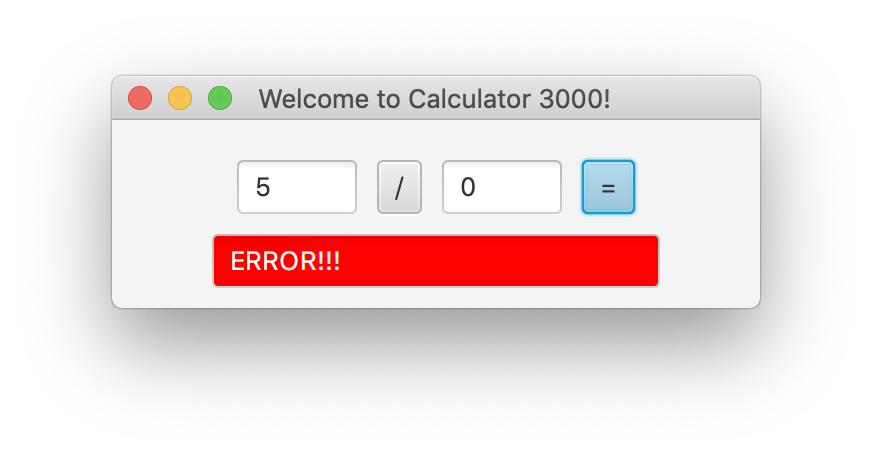
All of the functionality from Homework 3 should continue to work unless otherwise noted below.
Details
- The project will have the following files:
Main.java-> The Main classCalculator.java-> The class responsible for the calculator's computationsCalculatorController.java-> The Controller classcalculator.fxml-> The FXML file
- Using SceneBuilder, recreate your interface. Make sure to:
- Associate the scene with your
username.CalculatorController - Bind the operand TextFields and equals button to the same handler
- Use the following
fx:idvalues exactly. These names are required for testing:- firstOperand (the first TextField)
- operator (the Button with the operation being performed)
- secondOperand (the second TextField)
- result (the TextField with the answer)
- Overwrite the FXML file in your project with the one generated by SceneBuilder
- Associate the scene with your
- Code must be in its appropriate file
- All view information should be defined in the FXML file (View)
- All interaction between the user and the view should be defined in the Controller class (Controller)
- All computation and non-GUI related code should be in the Calculator class (Model)
- The Main class should be responsible for starting the application and loading the FXML file. Keeping the calculator functionality in a separate class makes it easier to add more functionality later without putting everything into the Main or Controller class.
Initializing the Controller
The CalculatorController should implement the JavaFX Initializable interface. JavaFX calls the initialize method after the FXML file has been loaded and the FXML controls have been connected to the Controller. You do not need to understand the parameters passed to the method for this assignment.
Use initialize in the same way that you would normally use a constructor for the Controller. Any Controller instance variables that are not created through FXML should be initialized in this method.
For example:
public class CalculatorController implements Initializable {
    @Override
    public void initialize(URL url, ResourceBundle resourceBundle) {
        // Initialize non-FXML instance variables here
    }
}
Calculator Class
The Calculator class should be responsible for performing the arithmetic operations. The Controller should use the Calculator rather than performing the calculations itself.
The Calculator class must contain and use a private functional interface to perform the arithmetic operations. How you design that interface and how you use it within the Calculator is up to you.
Additional Functionality
In addition to the functionality from Homework 3, we will add the following functionality:
- The operator button should start with
+. Clicking it will cycle through the operators in the following order:+-*/%- then back to
+
- The handler bound to the equals button and TextFields will perform the operation displayed in the operator button.
- The result TextField should have a light gray background when the application starts.
- If the result is negative, the background of the result TextField should be red. Otherwise, it should be light gray.
- If an exception occurs while processing a calculation, the result TextField should display
ERROR!!!and its background should be red.