Lab 2: Image Displayer 3001
Overview
In this assignment you will implement a Graphical User Interface (GUI) for your solution to Lab 1. Additionally, you will add functionality for two new binary file formats, .ibig, .isml, that can reduce the space taken by a great deal. Finally, you will create a custom Exception class that will be thrown when problems with the input data are encountered.
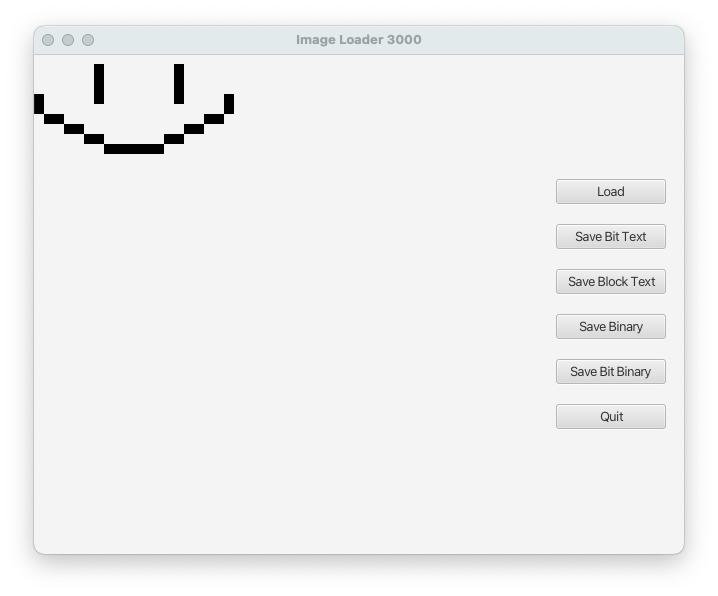
GUI
Your GUI must have separate buttons to use for saving each file format, for loading the image, and for quitting the program. You will
use a FileChooser
to obtain the File objects to read and write, and will have a single Canvas to draw the image onto.
An example of the GUI might look like this:
showOpenDialog() and showSaveDialog() you may pass
null to them for the required Window object. This will cause the
dialog to be displayed in the center of your screen.
You should, at a minimum, have the same six Buttons and use the same text as shown above for the Buttons, but the rest of the design and layout is up to you.
Image class updates
You must add a getPixels() method to the Image class. This method must return
the 2D array of pixels. This method will be called in order to draw the pixels onto
the Canvas object. You will need to draw a rectangle on the canvas for each pixel that
is a 1. To do this, you'll need to get the GraphicsContext from the canvas and use
fillRect() to draw the pixel.
Your Image class must also support the Integer Binary (.ibig) format. If you
choose to support the Bit Binary
(.isml) format, it too should be support in the Image class. To support this, you
will modify the constructor and save() methods. If the Path passed to the constructor
refers to a .ibig or .isml (if supported) file, the constructor should load the image.
The save() method should now support "ibig" and (optionally) "isml" formats in addition
to "01text" and "unicode". You must not add any public methods to the Image class.
No other public methods should be added to the Image class.
Integer Binary Format
This binary format stores all the image information as binary integer values.
- The first integer in the file represents the width of the image. This value must be positive and nonzero.
- The second integer in the file represents the height of the image. This value must be positive and nonzero.
- The remaining integer values represent the pixel values for the image. These values must either be
0or1. - There must be a total of \( width \times height + 2 \) integers in the file.
Files in this format must use .ibig file extension.
Bit Binary Format (Optional)
This optional binary format uses one bit for each pixel in the image. If you do not implement this format,
have your "Save Bit Binary" Button pop up an Alert indicating this functionality has not yet been implemented.
- The first integer in the file represents the width of the image. This value must be positive and nonzero.
- The second integer in the file represents the height of the image. This value must be positive and nonzero.
- The remaining byte values store the pixel values for the image.
- If the \( width \times height \) of the image is not divisible by 8, the unused bits in the last byte must all be zero.
Files in this format must use .isml file extension.
Overview of bit operators
The following operators are helpful for manipulating bits:
|— bitwise OR operator&— bitwise AND operator~— bitwise NOT operator^— bitwise XOR operator>>— logical right shift operator<<— left shift operator
We can represent binary literals by prefixing the number with 0b. E.g.,
0b00000001is equal to integer value1since the 1's place has a 1 in it and everything else is 0.0b00001111is equal to integer value15since the 1's, 2's, 4's and 8's places have 1 in them and the 16's, 32's, 64's, and 128's places have 0 in them. (15 == 1 + 2 + 4 + 8)
The following are all true:
0b00111100 | 0b11001100 == 0b11111100;
0b00111100 & 0b11001100 == 0b00001100;
0b00111100 ^ 0b11001100 == 0b11110000;
~0b00111100 == 0b11000011;
0b00001000 >> 2 == 0b00000010;
0b00001000 << 3 == 0b01000000;
Therefore, if we want to get the third bit from the right as an integer, we can do:
int bitValue = (byteValue >> 2) & 0b00000001;(byteValue >> 2)moves the bit from the 4's place to the 1's place.(result) & 0b00000001ensures all but the bit at the 1's place is zero.
If we want to place the value of an integer (with value of either 0 or 1) in the 8's
place and not disrupt the other bit values in the other places, we can do:
byteValue = ((intValueForPixel & 0b00000001) << 3) | (byteValue & 0b11110111);(intValueForPixel & 0b00000001)ensures all but the bit at the 1's place is zero.((result) << 3)moves the bit from the 1's place to the 8's place.(byteValue & 0b11110111)ensures that the bit at the 8's place is zero.- Here the value on the left contains zeros for every bit except at the 8's place and the value on the right keeps all the values original in byteValue except the bit at the 8's place.
(result1) | (result2)places a 1 in the 8's place ifintValueForPixelwas1. Otherwise, the 8's place will contain0.
Software Design
You should use your Image and PixelCluster classes from Lab 1 as the basis for the logic for this program. In addition,
you will need to create, organize, and display all of your GUI components and link them to the rest of your program. This should be
done in your main driver class using helper methods to break up the work.
InvalidFormatException
You must create a custom Exception class that will be thrown in place of an IllegalArgumentException when the exception is
caused not by an incorrect argument, but bad data. For example, if you are reading a block text file and the Unicode value
does not match any of the PixelCluster enum values, the argument (a String) is fine, but the data formatting is not.
The InvalidFormatException should have the following methods:
InvalidFormaException()— A no-parameter constructorInvalidFormaException(String message)— A constructor that takes a custom message
ImageDisplayer Class
Your ImageDisplayer class is where you will set up your GUI and kick off your program. It must extend the JavaFX Application class and have, at a minimum, the following public methods:
static void main(String[] args)— The main method of the program. It's sole purpose is to call the staticlaunchmethodvoid start(Stage stage)— This is where theSceneandStagewill be assembled and shown to the user.Scene buildGUI()— This is where the individual components will be created and added to the top-level container.- You should make use of helper methods to break up the work done in this method.
- The top-level container should be added to a new
Sceneand thatSceneis what will be returned to thestart()method
Exception Handling
If any problems are encountered with reading the input files or writing the output file, the program should display a useful error message using Alert objects. The program should not print anything to the console, nor should it crash or display any exceptions.
Acknowledgement
This laboratory assignment, developed by Prof. Sean Jones and Dr. Chris Taylor.