CSC 1001 — Lab 4 Practice Test: Tracing, Flowcharts, and Conditional Logic
Intro
Today's lab is a little strange because you started with the practice test. This lab is all individual practice, moving from tracing code by hand to matching code with flowcharts and finally drawing your own.
| Section | Mode | What You'll Do |
|---|---|---|
| Part 1: Trace the Code | Individual | Hand-trace two code snippets and predict their output. |
| Part 2: Match the Flowchart to the Code | Individual | Match two flowcharts to their corresponding code snippets. |
| Part 3: From Code, Draw the Flowchart | Individual | Draw flowcharts for two code snippets. |
Submit: your Lab 4 Worksheet. Due to the practice test — there is no code and no notebook to submit.
Part 1: Trace the Code
For each snippet, do NOT run the code. Trace it by hand and record your trace and final output on your Lab 4 Worksheet.
Snippet A
 1 x: int = 8
 2 y: int = 3
 3
 4 if x > y:
 5     if x % y == 0:
 6         result: str = "A"
 7     else:
 8         result: str = "B"
 9 else:
10     result: str = "C"
11
12 print(result)
Snippet B
 1 temp: int = 95
 2 humidity: int = 40
 3
 4 if temp > 90:
 5     if humidity > 50:
 6         advisory: str = "Heat Advisory"
 7     else:
 8         advisory: str = "Warm and Dry"
 9 elif temp > 70:
10     advisory: str = "Pleasant"
11 else:
12     advisory: str = "Cool"
13
14 print(advisory)
Part 2: Match the Flowchart to the Code
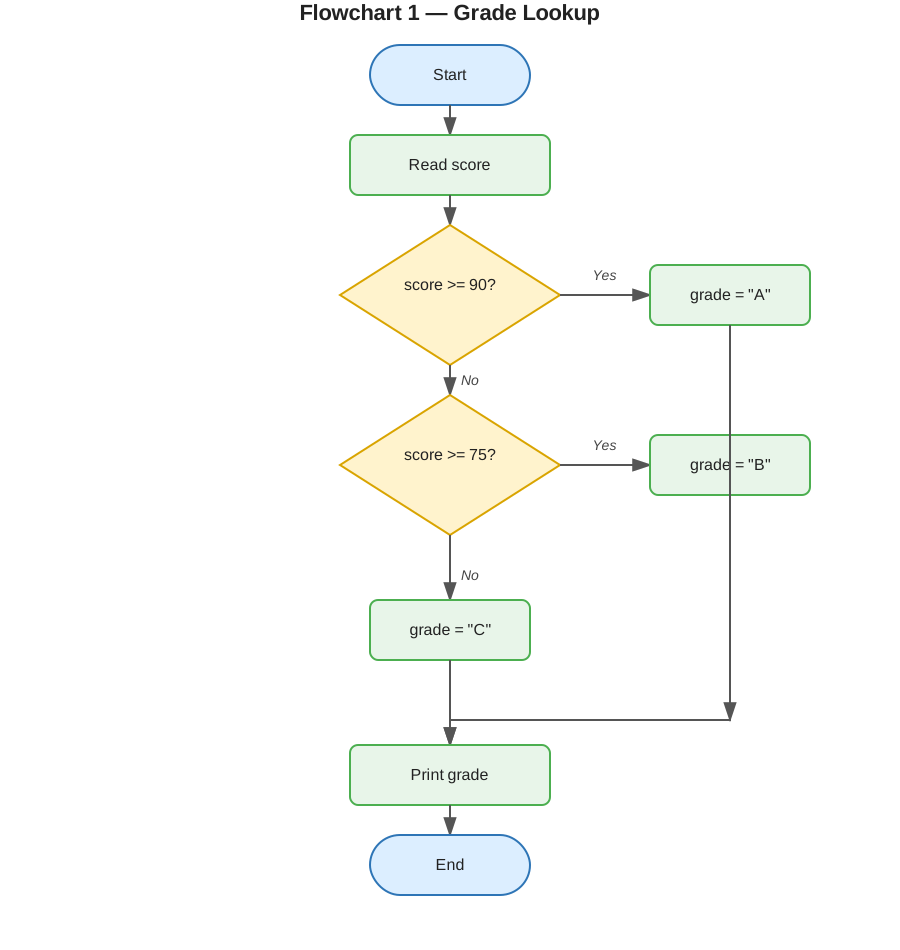
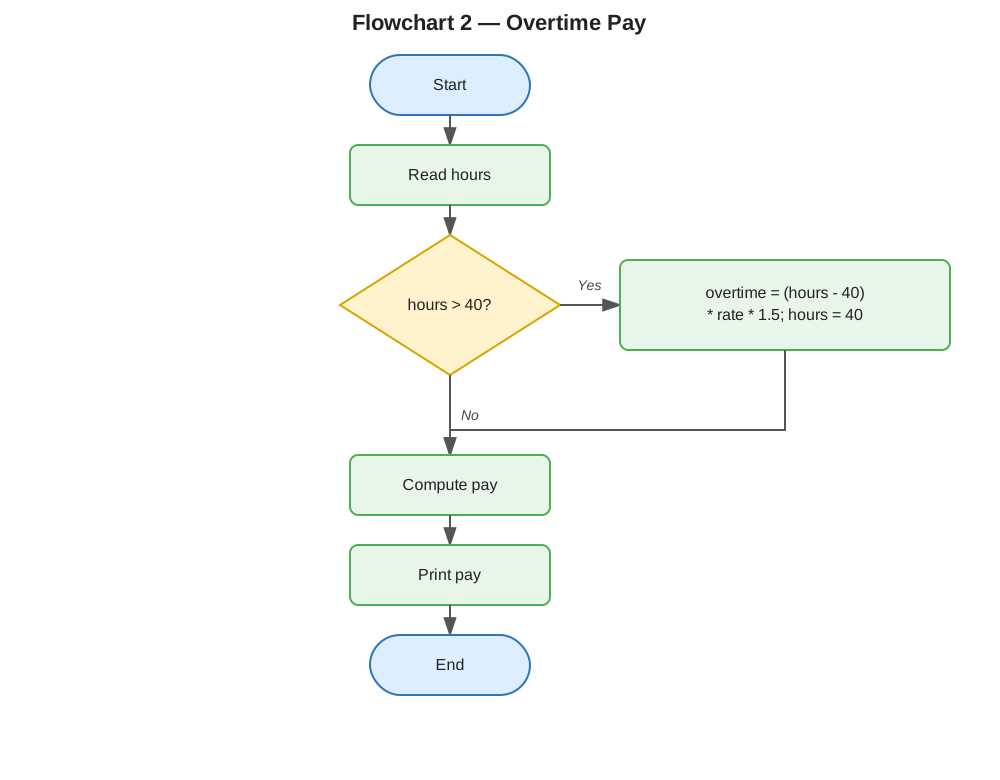
Instructions for students: Below are two flowcharts (Flowchart 1 and Flowchart 2) and three code snippets (Code Option 1, 2, and 3). Match each flowchart to its corresponding code snippet. One code snippet is a distractor and does not match either flowchart.
Flowchart 1
Flowchart 2
Code Option 1
hours: float = float(input("Enter hours worked: "))
rate: int = 20
overtime_pay: float = 0
if hours > 40:
    overtime_pay = (hours - 40) * rate * 1.5
    hours = 40
pay = hours * rate + overtime_pay
print(pay)
Code Option 2
score: int = int(input("Enter score: "))
if score >= 90:
    grade: str = "A"
elif score >= 75:
    grade: str = "B"
else:
    grade: str = "C"
print(grade)
Code Option 3
score: int = int(input("Enter score: "))
if score >= 90:
    grade: str = "A"
else:
    if score >= 75:
        grade: str = "B"
    else:
        grade: str = "C"
print(grade)
Student task: Record which code option matches each flowchart, and why, on your Lab 4 Worksheet.
Part 3: From Code, Draw the Flowchart
For each snippet, draw a flowchart on paper (or in a flowchart tool) that represents the logic exactly. Use a diamond for each decision point and make sure every branch is shown. Attach or paste your finished flowcharts on your Lab 4 Worksheet.
Snippet 1
age: int = int(input("Enter age: "))
has_id: bool = input("Has ID? (yes/no): ")

if age >= 21:
    print("Admitted")
elif age >= 18 and has_id == "yes":
    print("Admitted with ID check")
else:
    print("Not admitted")
Checklist for a complete flowchart:
- Start and End symbols present
- Every decision has exactly two labeled paths (Yes/No)
- All three possible outcomes ("Admitted", "Admitted with ID check", "Not admitted") appear somewhere on the diagram
-
The compound condition (
age >= 18 and has_id == "yes") is represented as a single decision, not split incorrectly
Snippet 2
num: int = int(input("Enter a number: "))

if num % 2 == 0:
    if num % 3 == 0:
        print("Divisible by 6")
    else:
        print("Even, not divisible by 3")
else:
    print("Odd")
Checklist for a complete flowchart:
- Start and End symbols present
- Two nested decision diamonds, not two sequential unrelated ones
-
The inner decision only appears on the branch where
num % 2 == 0is true - All three outcomes are represented
Reflection Questions
Record your answers on your Lab 4 Worksheet.